> For the complete documentation index, see [llms.txt](https://docs.constellationnetwork.io/llms.txt). Markdown versions of documentation pages are available by appending `.md` to page URLs; this page is available as [Markdown](https://docs.constellationnetwork.io/metagraph-development/guides/customize-rewards-logic.md).
# Customize Rewards Logic
In this guide, we will walk through two different methods of customizing rewards logic within your metagraph.
### Understanding Rewards[](https://docs.constellationnetwork.io/sdk/guides/customize-rewards#understanding-rewards)
Rewards are emitted on every timed snapshot of the metagraph and increase the circulating supply of the metagraph token beyond the initial balances defined in genesis.csv. These special transaction types can be used to distribute your currency to fund node operators, or create fixed pools of tokens over time.
By default, no rewards are distributed by a metagraph using the Metagraph Framework which results in a static circulating supply. The rewards customizations described below create inflationary currencies - the rate of which can be controlled by the specific logic introduced. Similarly, a maximum token supply can easily be introduced if desired to prevent unlimited inflation.
#### The Rewards Function[](https://docs.constellationnetwork.io/sdk/guides/customize-rewards#the-rewards-function)
The rewards function includes contextual information from the prior incremental update, including any data produced. Additionally, this function can include customized code capable of invoking any library function of your choice, allowing you to support truly custom use cases and advanced tokenomics structures. The following examples serve as a foundation for typical use cases, which you can expand upon and tailor to your project's needs.
### Before You Start[](https://docs.constellationnetwork.io/sdk/guides/customize-rewards#before-you-start)
This guide assumes that you have configured your local environment based on the [Quick Start Guide](https://docs.constellationnetwork.io/sdk/guides/quick-start) and have at least your `global-l0`, `currency-l0`, `currency-l1` clusters configured.
We will be updating the code within your project in the L0 module. This can be found in:
```
source/project//modules/l0/src/main/Main.scala
```
Please note, the examples below show all logic within a single file to make copy/pasting the code as simple as possible. In a production application you would most likely want to split the code into multiple files.
### Examples[](https://docs.constellationnetwork.io/sdk/guides/customize-rewards#examples)
These examples show different ways that rewards logic can be customized within your metagraph. The concepts displayed can be used independently or combined for further customization based on the business logic of your project.
#### Example: Distribute Rewards to Fixed Addresses[](https://docs.constellationnetwork.io/sdk/guides/customize-rewards#example-distribute-rewards-to-fixed-addresses)
Add the following code to your L0 Main.scala file.
```
package com.my.currency.l0
import cats.effect.{Async, IO}
import org.tessellation.BuildInfo
import org.tessellation.currency.dataApplication.BaseDataApplicationL0Service
import org.tessellation.currency.l0.CurrencyL0App
import org.tessellation.currency.schema.currency.{
CurrencyBlock,
CurrencyIncrementalSnapshot,
CurrencySnapshotStateProof,
CurrencyTransaction
}
import org.tessellation.schema.address.Address
import org.tessellation.schema.balance.Balance
import org.tessellation.schema.cluster.ClusterId
import org.tessellation.schema.transaction.{
RewardTransaction,
TransactionAmount
}
import org.tessellation.sdk.domain.rewards.Rewards
import org.tessellation.sdk.infrastructure.consensus.trigger.ConsensusTrigger
import org.tessellation.security.SecurityProvider
import org.tessellation.security.signature.Signed
import eu.timepit.refined.auto._
import cats.syntax.applicative._
import java.util.UUID
import scala.collection.immutable.{SortedSet, SortedMap}
object RewardsMintForPredefinedAddresses {
def make[F[_]: Async] =
new Rewards[
F,
CurrencyTransaction,
CurrencyBlock,
CurrencySnapshotStateProof,
CurrencyIncrementalSnapshot
] {
def distribute(
lastArtifact: Signed[CurrencyIncrementalSnapshot],
lastBalances: SortedMap[Address, Balance],
acceptedTransactions: SortedSet[Signed[CurrencyTransaction]],
trigger: ConsensusTrigger
): F[SortedSet[RewardTransaction]] = SortedSet(
Address("DAG8pkb7EhCkT3yU87B2yPBunSCPnEdmX2Wv24sZ"),
Address("DAG4o41NzhfX6DyYBTTXu6sJa6awm36abJpv89jB")
).map(RewardTransaction(_, TransactionAmount(55_500_0000L))).pure[F]
}
}
object Main
extends CurrencyL0App(
"custom-rewards-l0",
"custom-rewards L0 node",
ClusterId(UUID.fromString("517c3a05-9219-471b-a54c-21b7d72f4ae5")),
version = BuildInfo.version
) {
def dataApplication: Option[BaseDataApplicationL0Service[IO]] = None
def rewards(implicit sp: SecurityProvider[IO]) = Some(
RewardsMintForPredefinedAddresses.make[IO]
)
}
```
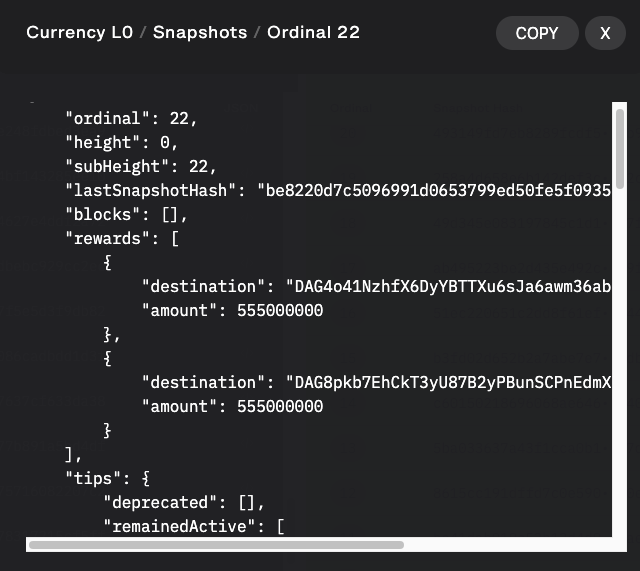
The code distributes 5.55 token rewards on each timed snapshot to two hardcoded addresses:
* DAG8pkb7EhCkT3yU87B2yPBunSCPnEdmX2Wv24sZ
* DAG4o41NzhfX6DyYBTTXu6sJa6awm36abJpv89jB
These addresses could represent treasury wallets or manually distributed rewards pools. Update the number of wallets and amounts to match your use-case.
**Rebuild Clusters**[****](https://docs.constellationnetwork.io/sdk/guides/customize-rewards#rebuild-clusters)
Run the following commands to rebuild your clusters with the new code:
```
scripts/hydra destroy
scripts/hydra build --no_cache
```
Once built, run hydra start to see your changes take effect.
```
scripts/hydra start-genesis
```
**View Changes**[****](https://docs.constellationnetwork.io/sdk/guides/customize-rewards#view-changes)
Using the [Developer Dashboard](https://docs.constellationnetwork.io/sdk/elements/developer-dashboard) you should see the balances of the two wallets above increase by 5.5 tokens after each snapshot.
Inspecting the snapshot body, you should also see an array of "rewards" transactions present.
#### Example: Distribute Rewards to Validator Nodes[](https://docs.constellationnetwork.io/sdk/guides/customize-rewards#example-distribute-rewards-to-validator-nodes)
Add the following code to your L0 Main.scala file.
```
package com.my.currency.l0
import cats.effect.{Async, IO}
import cats.implicits.{toFoldableOps, toFunctorOps, toTraverseOps}
import org.tessellation.BuildInfo
import org.tessellation.currency.dataApplication.BaseDataApplicationL0Service
import org.tessellation.currency.l0.CurrencyL0App
import org.tessellation.currency.schema.currency.{CurrencyBlock, CurrencyIncrementalSnapshot, CurrencySnapshotStateProof, CurrencyTransaction}
import org.tessellation.schema.address.Address
import org.tessellation.schema.balance.Balance
import org.tessellation.schema.cluster.ClusterId
import org.tessellation.schema.transaction.{RewardTransaction, TransactionAmount}
import org.tessellation.sdk.domain.rewards.Rewards
import org.tessellation.security.SecurityProvider
import org.tessellation.security.signature.Signed
import eu.timepit.refined.auto._
import org.tessellation.sdk.infrastructure.consensus.trigger.ConsensusTrigger
import java.util.UUID
import scala.collection.immutable.{SortedMap, SortedSet}
object RewardsMint1ForEachFacilitator {
def make[F[_]: Async: SecurityProvider] =
new Rewards[F, CurrencyTransaction, CurrencyBlock, CurrencySnapshotStateProof, CurrencyIncrementalSnapshot] {
def distribute(
lastArtifact: Signed[CurrencyIncrementalSnapshot],
lastBalances: SortedMap[Address, Balance],
acceptedTransactions: SortedSet[Signed[CurrencyTransaction]],
trigger: ConsensusTrigger
): F[SortedSet[RewardTransaction]] = {
val facilitatorsToReward = lastArtifact.proofs.map(_.id)
val addresses = facilitatorsToReward.toList.traverse(_.toAddress)
val rewardsTransactions = addresses.map(addresses => {
val addressesAsList = addresses.map(RewardTransaction(_, TransactionAmount(1_000_0000L)))
collection.immutable.SortedSet.empty[RewardTransaction] ++ addressesAsList
})
rewardsTransactions
}
}
}
object Main
extends CurrencyL0App(
"custom-rewards-l0",
"custom-rewards L0 node",
ClusterId(UUID.fromString("517c3a05-9219-471b-a54c-21b7d72f4ae5")),
version = BuildInfo.version
) {
def dataApplication: Option[BaseDataApplicationL0Service[IO]] = None
def rewards(implicit sp: SecurityProvider[IO]) = Some(
RewardsMint1ForEachFacilitator.make[IO]
)
}
```
The code distributes 1 token reward on each timed snapshot to each validator node that participated in the most recent round of consensus.
**Rebuild Clusters**[****](https://docs.constellationnetwork.io/sdk/guides/customize-rewards#rebuild-clusters-1)
Run the following commands to rebuild your clusters with the new code:
```
scripts/hydra destroy
scripts/hydra build --no_cache
```
Once built, run hydra start to see your changes take effect.
```
scripts/hydra start-genesis
```
**View Changes**[****](https://docs.constellationnetwork.io/sdk/guides/customize-rewards#view-changes-1)
Using the [Developer Dashboard](https://docs.constellationnetwork.io/sdk/elements/developer-dashboard) you should see the balances of the wallets in each node in your L0 cluster above increase by 1 token after each snapshot.
Inspecting the snapshot body, you should also see an array of "rewards" transactions present.
#### Example: Distribute Rewards Based on API Data[](https://docs.constellationnetwork.io/sdk/guides/customize-rewards#example-distribute-rewards-based-on-api-data)
Add the following code to your L0 Main.scala file.
```
package com.my.currency.l0
import cats.data.NonEmptyList
import cats.effect.{Async, IO}
import cats.implicits.catsSyntaxApplicativeId
import derevo.circe.magnolia.{decoder, encoder}
import derevo.derive
import org.tessellation.BuildInfo
import org.tessellation.currency.dataApplication.BaseDataApplicationL0Service
import org.tessellation.currency.l0.CurrencyL0App
import org.tessellation.currency.schema.currency.{CurrencyBlock, CurrencyIncrementalSnapshot, CurrencySnapshotStateProof, CurrencyTransaction}
import org.tessellation.schema.address.Address
import org.tessellation.schema.balance.Balance
import org.tessellation.schema.cluster.ClusterId
import org.tessellation.schema.transaction.{RewardTransaction, TransactionAmount}
import org.tessellation.sdk.domain.rewards.Rewards
import org.tessellation.security.SecurityProvider
import org.tessellation.security.signature.Signed
import eu.timepit.refined.numeric.Positive
import eu.timepit.refined.refineV
import eu.timepit.refined.types.numeric.PosLong
import org.tessellation.sdk.infrastructure.consensus.trigger.ConsensusTrigger
import io.circe.parser.decode
import java.util.UUID
import scala.collection.immutable.{SortedMap, SortedSet}
object RewardsMintForEachAddressOnApi {
private def getRewardAddresses: List[Address] = {
@derive(decoder, encoder)
case class AddressTimeEntry(address: Address, date: String)
try {
//Using host.docker.internal as host because we will fetch this from a docker container to a API that is on local machine
//You should replace to your url
val response = requests.get("http://host.docker.internal:8000/addresses")
val body = response.text()
println("API response" + body)
decode[List[AddressTimeEntry]](body) match {
case Left(e) => throw e
case Right(addressTimeEntries) => addressTimeEntries.map(_.address)
}
} catch {
case x: Exception => {
println(s"Error when fetching API: ${x.getMessage}")
List[Address]()
}
}
}
private def getAmountPerWallet(addressCount: Int): PosLong = {
val totalAmount: Long = 100_000_0000L
val amountPerWallet: Either[String, PosLong] = refineV[Positive](totalAmount / addressCount)
amountPerWallet.toOption match {
case Some(amount) => amount
case None =>
println("Error getting amount per wallet")
PosLong(1)
}
}
def make[F[_] : Async ] =
new Rewards[F, CurrencyTransaction, CurrencyBlock, CurrencySnapshotStateProof, CurrencyIncrementalSnapshot] {
def distribute(
lastArtifact: Signed[CurrencyIncrementalSnapshot],
lastBalances: SortedMap[Address, Balance],
acceptedTransactions: SortedSet[Signed[CurrencyTransaction]],
trigger: ConsensusTrigger
): F[SortedSet[RewardTransaction]] = {
val rewardAddresses = getRewardAddresses
val foo = NonEmptyList.fromList(rewardAddresses)
foo match {
case Some(addresses) =>
val amountPerWallet = getAmountPerWallet(addresses.size)
val rewardAddressesAsSortedSet = SortedSet(addresses.toList: _*)
rewardAddressesAsSortedSet.map(address => {
val txnAmount = TransactionAmount(amountPerWallet)
RewardTransaction(address, txnAmount)
}).pure[F]
case None =>
println("Could not find reward addresses")
val nodes: SortedSet[RewardTransaction] = SortedSet.empty
nodes.pure[F]
}
}
}
}
object Main
extends CurrencyL0App(
"custom-rewards-l0",
"custom-rewards L0 node",
ClusterId(UUID.fromString("517c3a05-9219-471b-a54c-21b7d72f4ae5")),
version = BuildInfo.version
) {
def dataApplication: Option[BaseDataApplicationL0Service[IO]] = None
def rewards(implicit sp: SecurityProvider[IO]) = Some(
RewardsMintForEachAddressOnApi.make[IO]
)
}
```
The code distributes token rewards on each timed snapshot to each address that is returned from a custom API.
On this [Repository](https://github.com/Constellation-Labs/metagraph-examples/) you can take a better look at the template example and the custom API.
In the repository, the code will distribute the amount of 100 tokens between the number of returned wallets (in this case the maximum of 20 latest wallets)
**Rebuild Clusters**[****](https://docs.constellationnetwork.io/sdk/guides/customize-rewards#rebuild-clusters-2)
Run the following commands to rebuild your clusters with the new code:
```
scripts/hydra destroy
scripts/hydra build --no_cache
```
Once built, run hydra start to see your changes take effect.
```
scripts/hydra start-genesis
```
**View Changes**[****](https://docs.constellationnetwork.io/sdk/guides/customize-rewards#view-changes-2)
Using the [Developer Dashboard](https://docs.constellationnetwork.io/sdk/elements/developer-dashboard) you should see the balances of the wallets in each node in your L0 cluster above increase by ( 100 / :number\_of\_wallets ) tokens after each snapshot.
Inspecting the snapshot body, you should also see an array of "rewards" transactions present.
---
# Agent Instructions
This documentation is published with GitBook. GitBook is the documentation platform designed so that both humans and AI agents can read, navigate, and reason over technical content effectively. Learn more at gitbook.com.
## Querying This Documentation
If you need additional information that is not directly available in this page, you can query the documentation by asking a question.
Perform an HTTP GET request on the following URL with the `ask` and `goal` query parameters:
```
GET https://docs.constellationnetwork.io/metagraph-development/guides/customize-rewards-logic.md?ask=&goal=
```
`ask` is the immediate question: it should be specific, self-contained, and written in natural language.
`goal` is what the user is ultimately trying to achieve, the reason they need the answer. Sharing it helps GitBook give you a better, more relevant answer. A goal is most helpful when it describes the outcome the user wants rather than restating the question. For example, with `ask=how do I create an API token`, a goal like `automate deployments from our CI pipeline` lets GitBook tailor the answer to that use case.
The response will contain a direct answer to the question and relevant excerpts and sources from the documentation.
Use this mechanism when the answer is not explicitly present in the current page, you need clarification or additional context, or you want to retrieve related documentation sections.