> For the complete documentation index, see [llms.txt](https://docs.constellationnetwork.io/llms.txt). Markdown versions of documentation pages are available by appending `.md` to page URLs; this page is available as [Markdown](https://docs.constellationnetwork.io/network-apis/concepts/architecture.md).
# Architecture
## Architecture
{% hint style="info" %}
**Transaction Lifecyle**
Interested in more in-depth information about the currency transaction lifecycle and data flow within the Hypergraph? See [Network Fundamentals Architecture](/network-fundamentals/concepts/architecture.md) for more info.
{% endhint %}
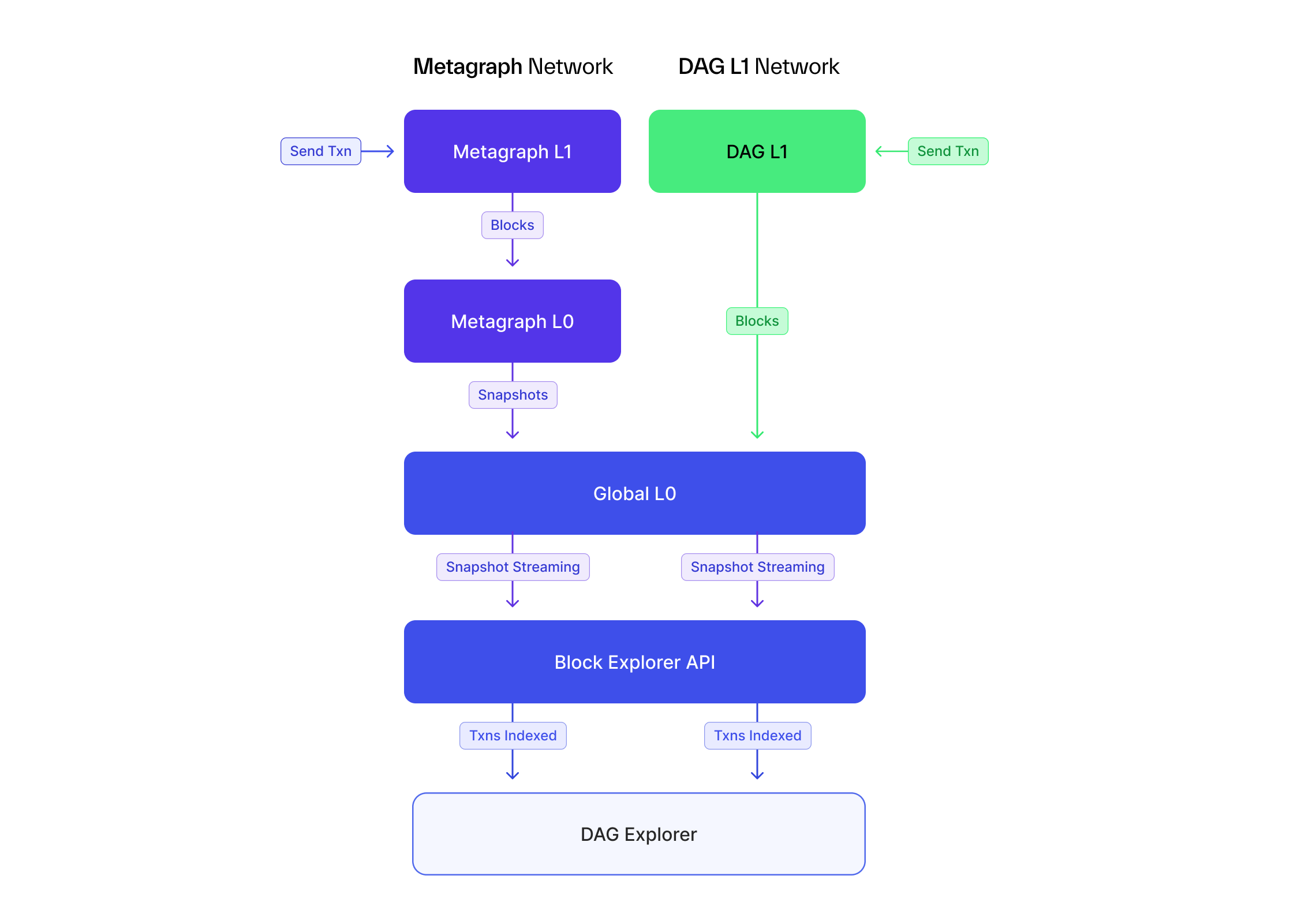
In order to make the most of Constellation Network APIs, a brief understanding of the architecture of the network is useful. The Hypergraph consists of multiple layers of networks of individual responsibility through which transactions flow. Each of the major network layers has REST API endpoints available with distinct functionality. Transactions are sent to the outermost layer, labeled as L1 networks in the graphic, before being processed into a state snapshot in an L0 layer.
DAG transactions are sent to the DAG L1 network which bundles the transactions into blocks and sends them to the Global L0 for inclusion into global snapshots. Snapshots are then indexed by the Block Explorer via a snapshot streaming service that processes them.
Metagraph token transactions flow in a similar way from the metagraph currency L1 where they're received, bundled into blocks, and then passed to the currency L0 layer to be included in metagraph snapshots. The metagraph snapshots are then submitted to the Global L0 to be included in global snapshots and eventually indexed into the Block Explorer via the snapshot streaming service.
The APIs for each of the L1 and L0 layers is nearly identical with a few minor differences, namely endpoint naming of `/dag` for DAG endpoints and `/currency` for currency endpoints. You can explore the API specs for each in the [Network APIs](broken://pages/MvMUSTiDwfE0qv8xAewu) sections below.
In summary, the functionalities of the different APIs for DAG and metagraph tokens are as follows:
## DAG[](https://docs.constellationnetwork.io/hypergraph/architecture#dag)
### DAG L1[](https://docs.constellationnetwork.io/hypergraph/architecture#dag-l1)
* DAG transactions are sent to this API via the `/transactions` POST endpoint.
* Pending transactions can be queried through this API via the `/transactions/:hash` endpoint.
* The address `lastRef` for an address can be queried here as well.
### Global L0[](https://docs.constellationnetwork.io/hypergraph/architecture#global-l0)
* Query global snaphots
* Query DAG supply and address balances
* Submit metagraph (state channel) snapshots
## Metagraph Tokens[](https://docs.constellationnetwork.io/hypergraph/architecture#metagraph-tokens)
### Metagraph L1[](https://docs.constellationnetwork.io/hypergraph/architecture#metagraph-l1)
* DAG transactions are sent to this API via the `/transactions` POST endpoint.
* Pending transactions can be queried through this API via the `/transactions/:hash` endpoint.
* The address `lastRef` for an address can be queried here as well.
### Metagraph L0[](https://docs.constellationnetwork.io/hypergraph/architecture#metagraph-l0)
* Query metagraph snapshots
* Query metagraph token supply and address balances
### Global L0[](https://docs.constellationnetwork.io/hypergraph/architecture#global-l0-1)
* Submit metagraph (state channel) snapshots
---
# Agent Instructions
This documentation is published with GitBook. GitBook is the documentation platform designed so that both humans and AI agents can read, navigate, and reason over technical content effectively. Learn more at gitbook.com.
## Querying This Documentation
If you need additional information that is not directly available in this page, you can query the documentation by asking a question.
Perform an HTTP GET request on the following URL with the `ask` and `goal` query parameters:
```
GET https://docs.constellationnetwork.io/network-apis/concepts/architecture.md?ask=&goal=
```
`ask` is the immediate question: it should be specific, self-contained, and written in natural language.
`goal` is what the user is ultimately trying to achieve, the reason they need the answer. Sharing it helps GitBook give you a better, more relevant answer. A goal is most helpful when it describes the outcome the user wants rather than restating the question. For example, with `ask=how do I create an API token`, a goal like `automate deployments from our CI pipeline` lets GitBook tailor the answer to that use case.
The response will contain a direct answer to the question and relevant excerpts and sources from the documentation.
Use this mechanism when the answer is not explicitly present in the current page, you need clarification or additional context, or you want to retrieve related documentation sections.